
Cisco Gigabit Ethernet Switch Module for HP BladeSystem p-Class Command Reference Guide




2-345
Cisco Gigabit Ethernet Switch Module for the HP p-Class BladeSystem Command Reference Guide
380265-003
Chapter 2 CGESM Switch Cisco IOS Commands
show interfaces
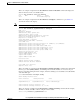
This is an example of output from the show interfaces status err-disabled command. It displays the
status of interfaces in the error-disabled state.
Switch# show interfaces status err-disabled
Port Name Status Reason
Gi0/2 err-disabled dtp-flap
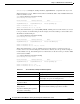
This is an example of output from the show interfaces switchport command for a port. Table 2-21
describes the fields in the display.
Note Private VLANs are not supported in this release, so those fields are not applicable.
Switch# show interfaces gigabitethernet0/1 switchport
Name: Gi0/1
Switchport: Enabled
Administrative Mode: dynamic auto
Operational Mode: static access
Administrative Trunking Encapsulation: negotiate
Operational Trunking Encapsulation: native
Negotiation of Trunking: On
Access Mode VLAN: 1 (default)
Trunking Native Mode VLAN: 1 (default)
Voice VLAN: none
Administrative private-vlan host-association:10 (VLAN0010) 502 (VLAN0502)
Administrative private-vlan mapping: none
Administrative private-vlan trunk native VLAN: none
Administrative private-vlan trunk encapsulation: dot1q
Administrative private-vlan trunk normal VLANs: none
Administrative private-vlan trunk private VLANs: none
Operational private-vlan: none
Trunking VLANs Enabled: ALL
Pruning VLANs Enabled: 2-1001
Capture Mode Disabled
Capture VLANs Allowed: ALL
Protected: false
Unknown unicast blocked: disabled
Unknown multicast blocked: disabled
Voice VLAN: none (Inactive)
Appliance trust: none
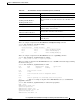
This is an example of out put from the show interfaces switchport backup command when a Flex Link
interface goes down (LINK_DOWN), and VLANs preferred on this interface are moved to the peer
interface of the Flex Link pair. In this example, if interface Gi0/6 goes down, Gi0/8 carries all VLANs
of the Flex Link pair.
Switch#show interfaces switchport backup
Switch Backup Interface Pairs:
Active Interface Backup Interface State
------------------------------------------------------------------------
GigabitEthernet0/6 GigabitEthernet0/8 Active Down/Backup Up
Vlans Preferred on Active Interface: 1-50
Vlans Preferred on Backup Interface: 60, 100-120
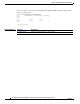
This is an example of output from the show interfaces switchport backup command. In this example,
VLANs 1 to 50, 60, and 100 to 120 are configured on the switch:
Switch(config)#interface gigabitEthernet 0/6