
Cisco Gigabit Ethernet Switch Module for HP BladeSystem p-Class Command Reference Guide




2-346
Cisco Gigabit Ethernet Switch Module for the HP p-Class BladeSystem Command Reference Guide
380265-003
Chapter 2 CGESM Switch Cisco IOS Commands
show interfaces
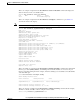
Switch(config-if)#switchport backup interface gigabitEthernet 0/8 prefer vlan 60,100-120
When both interfaces are up, Gi0/8 forwards traffic for VLANs 60, 100 to 120, and Gi0/6 will forward
traffic for VLANs 1 to 50.
Switch#show interfaces switchport backup
Switch Backup Interface Pairs:
Active Interface Backup Interface State
------------------------------------------------------------------------
GigabitEthernet0/6 GigabitEthernet0/8 Active Up/Backup Up
Vlans on Interface Gi 0/6: 1-50
Vlans on Interface Gi 0/8: 60, 100-120
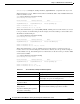
When a Flex Link interface goes down (LINK_DOWN), VLANs preferred on this interface are moved
to the peer interface of the Flex Link pair. In this example, if interface Gi0/6 goes down, Gi0/8 carries
all VLANs of the Flex Link pair.
Switch#show interfaces switchport backup
Switch Backup Interface Pairs:
Active Interface Backup Interface State
------------------------------------------------------------------------
GigabitEthernet0/6 GigabitEthernet0/8 Active Down/Backup Up
Vlans on Interface Gi 0/6:
Vlans on Interface Gi 0/8: 1-50, 60, 100-120
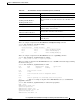
When a Flex Link interface comes up, VLANs preferred on this interface are blocked on the peer
interface and moved to the forwarding state on the interface that has just come up. In this example, if
interface Gi0/6 comes up, then VLANs preferred on this interface are blocked on the peer interface Gi0/8
and forwarded on Gi0/6.
Switch#show interfaces switchport backup
Switch Backup Interface Pairs:
Active Interface Backup Interface State
------------------------------------------------------------------------
GigabitEthernet0/6 GigabitEthernet0/8 Active Up/Backup Up
Vlans on Interface Gi 0/6: 1-50
Vlans on Interface Gi 0/8: 60, 100-120
Table 2-21 show interfaces switchport Field Descriptions
Field Description
Name Displays the port name.
Switchport Displays the administrative and operational status of the port.
In this display, the port is in switchport mode.
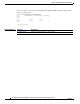
Administrative Mode
Operational Mode
Displays the administrative and operational modes.
Administrative Trunking
Encapsulation
Operational Trunking Encapsulation
Negotiation of Trunking
Displays the administrative and operational encapsulation
method and whether trunking negotiation is enabled.