
Cisco Gigabit Ethernet Switch Module for HP BladeSystem p-Class Command Reference Guide

2-381
Cisco Gigabit Ethernet Switch Module for the HP p-Class BladeSystem Command Reference Guide
380265-003
Chapter 2 CGESM Switch Cisco IOS Commands
show mac address-table aging-time
show mac address-table aging-time
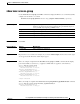
Use the show mac address-table aging-time user EXEC command to display the aging time of a
specific address table instance, all address table instances on a specified VLAN or, if a specific VLAN
is not specified, on all VLANs.
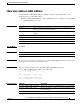
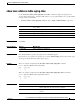
show mac address-table aging-time [vlan vlan-id] [ | {begin | exclude | include} expression]
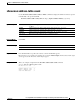
Syntax Description
Command Modes User EXEC
Command History
Usage Guidelines If no VLAN number is specified, the aging time for all VLANs appears.
Expressions are case sensitive. For example, if you enter | exclude output, the lines that contain output
do not appear, but the lines that contain Output appear.
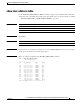
Examples This is an example of output from the show mac address-table aging-time command:
Switch> show mac address-table aging-time
Vlan Aging Time
---- ----------
1 300
This is an example of output from the show mac address-table aging-time vlan 10 command:
Switch> show mac address-table aging-time vlan 10
Vlan Aging Time
---- ----------
10 300
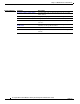
Related Commands
vlan vlan-id (Optional) Display aging time information for a specific VLAN. The range
is 1 to 4094.
| begin (Optional) Display begins with the line that matches the expression.
| exclude (Optional) Display excludes lines that match the expression.
| include (Optional) Display includes lines that match the specified expression.
expression Expression in the output to use as a reference point.
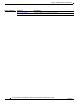
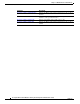
Release Modification
12.2(25)SE1 This command was introduced.
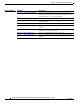
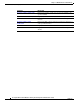
Command Description
mac address-table aging-time Sets the length of time that a dynamic entry remains in the MAC
address table after the entry is used or updated.
show mac address-table address Displays MAC address table information for the specified MAC
address.