
Cisco Gigabit Ethernet Switch Module for HP BladeSystem p-Class Command Reference Guide

2-444
Cisco Gigabit Ethernet Switch Module for the HP p-Class BladeSystem Command Reference Guide
380265-003
Chapter 2 CGESM Switch Cisco IOS Commands
show vlan
show vlan
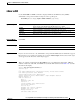
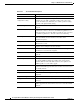
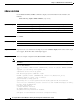
Use the show vlan user EXEC command to display the parameters for all configured VLANs or one
VLAN (if the VLAN ID or name is specified) on the switch.
show vlan [brief | id vlan-id | mtu | name vlan-name | remote-span | summary] [ | {begin |
exclude | include} expression]
Syntax Description
Note Though visible in the command-line help string, the ifindex, internal usage, and private-vlan keywords
are not supported.
Command Modes User EXEC
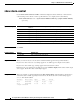
Command History
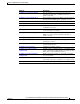
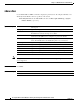
brief (Optional) Display one line for each VLAN with the VLAN name, status,
and its ports.
dot1q tag native (Optional) Display the IEEE 802.1Q native VLAN tagging status.
id vlan-id (Optional) Display information about a single VLAN identified by VLAN
ID number. For vlan-id, the range is 1 to 4094.
mtu (Optional) Display a list of VLANs and the minimum and maximum
transmission unit (MTU) sizes configured on ports in the VLAN.
name vlan-name (Optional) Display information about a single VLAN identified by VLAN
name. The VLAN name is an ASCII string from 1 to 32 characters.
remote-span (Optional) Display information about Remote SPAN (RSPAN) VLANs.
summary (Optional) Display VLAN summary information.
| begin (Optional) Display begins with the line that matches the expression.
| exclude (Optional) Display excludes lines that match the expression.
| include (Optional) Display includes lines that match the specified expression.
expression Expression in the output to use as a reference point.
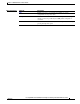
Release Modification
12.2(25)SE1 This command was introduced.