
Cisco Gigabit Ethernet Switch Module for HP BladeSystem p-Class Command Reference Guide


2-67
Cisco Gigabit Ethernet Switch Module for HP BladeSystem p-Class Command Reference Guide
380265-003
Chapter 2 CGESM Switch Cisco IOS Commands
define interface-range
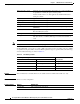
For physical interfaces:
• module is always 0.
• the range is type 0/number - number (for example, gigabitethernet 0/1 - 2).
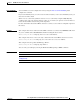
When you define a range, you must enter a space before the hyphen (-), for example:
gigabitethernet0/1 - 2
You can also enter multiple ranges. When you define multiple ranges, you must enter a space after the
first entry before the comma (,). The space after the comma is optional, for example:
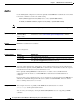
Examples This example shows how to create a multiple-interface macro:
Switch(config)# define interface-range macro1 gigabitethernet0/1 - 2,
gigabitethernet0/5 - 7
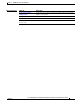
Related Commands Command Description
interface range Executes a command on multiple ports at the same time.
show running-config Displays the current operating configuration, including defined
macros. For syntax information, select Cisco IOS Configuration
Fundamentals Command Reference, Release 12.2 > File Management
Commands > Configuration File Management Commands.