
Cisco Gigabit Ethernet Switch Module for HP BladeSystem p-Class Hardware Installation Guide

Product Overview
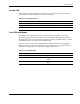
System LED
The System (Syst) LED shows whether the system is receiving power and is functioning
properly. Table 1-2 lists the LED colors and their meanings.
Table 1-2: System (Syst) LED
Color System Status
Off System is not powered on.
Green System is operating normally.
Amber System is receiving power but is not functioning properly.
Port LEDs and Modes
Each RJ-45 port and SFP module slot has a port LED. These port LEDs, as a group or
individually, display information about the switch and about the individual ports. The port
modes determine the type of information displayed through the port LEDs. Table 1-3 lists the
mode LEDs and their associated port mode and meaning.
To select or change a mode, press the Mode button until the desired mode is highlighted.
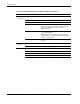
When you change port modes, the meanings of the port LED colors also change. Table 1-4
explains how to interpret the port LED colors in different port modes.
Table 1-3: Port Mode LEDs
Mode LED Port Mode Description
Stat Port status The port status. This is the default mode.
Dplx Port duplex mode The port duplex mode: full duplex or half
duplex.
Spd Port speed The port operating speed: 10, 100, or 1000
Mbps.
Cisco Gigabit Ethernet Switch Module for HP BladeSystem p-Class Hardware Installation Guide 1-5