
Cisco Gigabit Ethernet Switch Module for HP BladeSystem p-Class Hardware Installation Guide

Product Overview
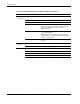
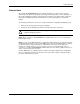
Table 1-4: Meaning of LED Colors in Different Modes on the Switch
Port Mode LED Color Meaning
STAT
(port status)
Off No link or port was administratively shut down.
Green Link present.
Blinking green Activity. Port is transmitting or receiving data.
Alternating green-amber Link fault. Error frames can affect connectivity, and
errors such as excessive collisions, CRC errors, and
alignment and jabber errors are monitored for a
link-fault indication.
Amber Port is blocked by Spanning Tree Protocol (STP) and
is not forwarding data.
Note: After a port is reconfigured, the port LED can
remain amber for up to 30 seconds as STP checks the
switch for possible loops.
Blinking amber Port is blocked by STP and is transmitting or receiving
packets.
DPLX
(duplex)
Off Port is operating in half duplex.
Green Port is operating in full duplex.
SPD
10/100/1000 ports
Off Port is operating at 10 Mbps.
Green Port is operating at 100 Mbps.
Blinking green Port is operating at 1000 Mbps.
1-6 Cisco Gigabit Ethernet Switch Module for HP BladeSystem p-Class Hardware Installation Guide