
Cisco Gigabit Ethernet Switch Module for HP BladeSystem p-Class Hardware Installation Guide


Product Overview
Rear Panel
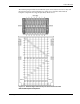
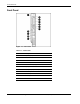
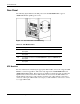
The following figure illustrates the SFP ports for the 10/100/1000BASE-T copper or
1000BASE-SX fiber uplinks (ports 19-22).
Figure 1-4: Rear Panel SFP Port Numbering
Table 1-5: SFP Module Ports
Port Description
22 Port 22 SFP connector for 10/100/1000BASE-T copper or 1000BASE-SX
fiber uplink
21 Port 21 SFP connector for 10/100/1000BASE-T copper or 1000BASE-SX
fiber uplink
20 Port 20 SFP connector for 10/100/1000BASE-T copper or 1000BASE-SX
fiber uplink
19 Port 19 SFP connector for 10/100/1000BASE-T copper or 1000BASE-SX
fiber uplink
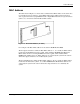
SFP Modules
For more information on obtaining the appropriate SFP modules, refer to the “Supported SFP
Modules” section in Appendix C. The switch only supports the 10/100/1000BASE-T and
1000BASE-SX SFP modules. These transceiver modules are field-replaceable, providing the
uplink interfaces when inserted in an SFP module slot. You can use the SFP modules for
Gigabit uplink connections to other switches. Use fiber-optic cables with LC connectors to
connect to a fiber-optic SFP module. Use Category 5 cable with RJ-45 connectors to connect
to a copper SFP module.
1-8 Cisco Gigabit Ethernet Switch Module for HP BladeSystem p-Class Hardware Installation Guide