
Cisco Gigabit Ethernet Switch Module for HP BladeSystem p-Class Hardware Installation Guide

Troubleshooting
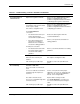
Table 4-1: Troubleshooting – Commo n Problems and Solutions
Problem Possible Cause Possible Solution
Duplex autonegotiation mismatch Refer to the Cisco Gigabit Ethernet Switch
Module for HP BladeSystem p-Class
Software Configuration Guide for information
on identifying autonegotiation mismatches.
Cabling distance exceeded
Port statistics show excessive frame
check sequence (FCS),
late-collision, or alignment errors.
Refer to the Cisco Gigabit Ethernet Switch
Module for HP BladeSystem p-Class
Software Configuration Guide for information
on displaying port statistics.
For 10/100/1000BASE-T
connections:
• The distance between the port
and the attached device
exceeds 328 feet (100 meters).
Reduce the cable length to within the
recommended distance.
• If the switch is attached to a
repeater, the total distance
between the two end stations
exceeds the cabling guidelines.
Refer to your repeater documentation for
cabling guidelines.
For SFP port connections:
• The distance between the SFP
port and the attached device
exceeds the SFP cabling
guidelines.
Refer to your SFP documentation for cabling
guidelines.
Bad adapter in attached device
Excessive errors found in port
statistics.
Run adapter card diagnostic utility.
Poor performance or
excessive errors
STP checking for possible loops. Wait 30 seconds for the port LED to turn
green.
Incorrect or bad cable
These are results of no link at both
ends:
A crossover cable was used when a
straight-through was required, or
vice-versa.
For the correct pinouts and the proper
application of crossover vs. straight-through
cables, see the “Two Twisted-Pair Cable
Pinouts” section in Appendix C.
The cable is wired incorrectly. Replace with a tested good cable.
A crossover or straight-through cable
is wired incorrectly.
For 10/100/1000BASE-T connections, be
sure to use a twisted four-pair, Category 5
cable.
No connectivity
STP checking for possible loops. Wait 30 seconds for the port LED to turn
green.
continued
Cisco Gigabit Ethernet Switch Module for HP BladeSystem p-Class Hardware Installation Guide 4-7