
Cisco Gigabit Ethernet Switch Module for HP BladeSystem p-Class Hardware Installation Guide

Troubleshooting
4-8 Cisco Gigabit Ethernet Switch Module for HP BladeSystem p-Class Hardware Installation Guide
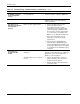
Table 4-1: Troubleshooting – Common Problems and Solutions continued
Problem Possible Cause Possible Solution
Unreadable characters
on the management
console
Incorrect baud rate Reset the emulation software to 9600 baud.
Amber system LED
Fatal POST error detected. Contact HP. Refer to the “Where to Go for
Additional Help” section in this guide for
contact information.
The switch port is
placed in error-disabled
state after SFP is
inserted.
Bad or non-Cisco-approved SFP.
1. Remove the SFP module from the
switch, and replace it with a
Cisco-approved module. Use the
errdisable recovery cause gbic-invalid
global configuration command to verify
the port status, and enter a time interval
to recover from the error-disable state.
Note: You can obtain SFP modules from
HP. For more information, refer to
Appendix C, “Connector and Cable
Specifications”.
2. Refer to the Cisco Gigabit Ethernet
Switch Module for HP BladeSystem p-
Class Command Reference Guide on the
HP website at http://www.hp.com/support
for information on the errdisable recovery
command.
Switch does not
recognize the SFP
module
The SFP module might be installed
improperly.
Verify that the SFP module is installed
properly. For more information on installing an
SFP module, refer to the “Installing SFP
Modules” section in Chapter 2.
The SFP module does not snap into
the slot.
1. Remove the SFP module. Inspect for
physical damage to the connector, the
module, and the module slot.
2. Replace the SFP module with a known
good SFP module.