
Cisco Gigabit Ethernet Switch Module for HP p-Class BladeSystem Software Configuration Guide

9-17
Cisco Gigabit Ethernet Switch Module for HP p-Class BladeSystem Software Configuration Guide
380261-003
Chapter 9 Configuring VLANs
Configuring VLAN Trunks
• Make sure the native VLAN for an IEEE 802.1Q trunk is the same on both ends of the trunk link. If
the native VLAN on one end of the trunk is different from the native VLAN on the other end,
spanning-tree loops might result.
• Disabling spanning tree on the native VLAN of an IEEE 802.1Q trunk without disabling spanning
tree on every VLAN in the network can potentially cause spanning-tree loops. We recommend that
you leave spanning tree enabled on the native VLAN of an IEEE 802.1Q trunk or disable spanning
tree on every VLAN in the network. Make sure your network is loop-free before disabling spanning
tree.
Default Layer 2 Ethernet Interface VLAN Configuration
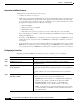
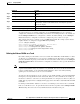
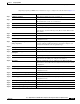
Table 9-6 shows the default Layer 2 Ethernet interface VLAN configuration.
Configuring an Ethernet Interface as a Trunk Port
Because trunk ports send and receive VTP advertisements, to use VTP you must ensure that at least one
trunk port is configured on the switch and that this trunk port is connected to the trunk port of a second
switch. Otherwise, the switch cannot receive any VTP advertisements.
These sections contain this configuration information:
• Interaction with Other Features, page 9-18
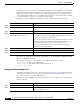
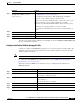
• Defining the Allowed VLANs on a Trunk, page 9-19
• Changing the Pruning-Eligible List, page 9-20
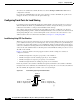
• Configuring the Native VLAN for Untagged Traffic, page 9-21
Note By default, trunks negotiate encapsulation. If the neighboring interface supports ISL and IEEE 802.1Q
encapsulation and both interfaces are set to negotiate the encapsulation type, the trunk uses ISL
encapsulation.
Table 9-6 Default Layer 2 Ethernet Interface VLAN Configuration
Feature Default Setting
Interface mode switchport mode dynamic auto
Trunk encapsulation switchport trunk encapsulation negotiate
Allowed VLAN range VLANs 1 to 4094
VLAN range eligible for pruning VLANs 2 to 1001
Default VLAN (for access ports) VLAN 1
Native VLAN (for IEEE 802.1Q trunks) VLAN 1