
HP Designjet T2300 eMFP and T790/T1300 ePrinter Series - Web Connected Features User Guide
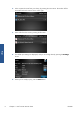



6. Select a particular event from your Library by pressing the event name. The number of files
associated with each event is shown on the right.
7. Select a file from the event by pressing the file name.
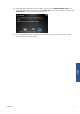
8. The default print settings are displayed, and you can change them by pressing the Settings
button.
9. When you are ready to print, press the Start button.
6 Chapter 3 Print from HP ePrint & Share ENWW
Print