
HP DesignJet T790 and T1300 Printer Series - Using your printer


Printing paper info
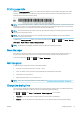
Enable the Printing paper info option to record the printer’s estimate of the remaining roll length, paper width
and type. The information is a combination of barcode and text that is printed on the leading edge of the roll
when the paper is unloaded from the printer.
NOTE: The paper-length estimate is available only if the printer registered the amount of paper that was on the
roll when you loaded it. To provide this information to the printer, specify the roll length on the front panel when
loading the paper, or load a roll that has the paper-data barcode printed on it.
NOTE: The barcode and text are printed on the roll only when the loading and unloading processes are started
from the front panel's Paper menu.
NOTE: This option can be expected to work only with papers that are completely opaque. It may fail with
transparent or translucent papers.
To enable the Printing paper info option, go to the front panel and press , then , then Setup > Printing
preferences
> Paper options > Enable printing paper info.
NOTE: Enabling this option slightly changes the paper loading and unloading procedures.
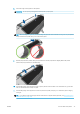
Move the paper
If the printer is idle (ready to print), you can move the paper forwards or backwards from the front panel. You
may want to do this in order to have more or less white space between the last print and the next one.
To move the paper, press , then , then Paper > Move paper.
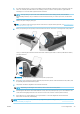
Maintain paper
To maintain paper quality, follow the recommendations below.
●
Store rolls covered by another piece of paper or cloth
●
Store cut sheets covered and clean or brush them before loading them in the printer
●
Clean input and output platens
●
Always keep the window of your printer closed
NOTE: Photo and coated paper requires careful handling, see The print is scued or scratched on page 147.
Change the drying time
You may wish to change the drying time setting to suit special printing conditions such as multiple prints where
time is of higher importance or when you need to be sure ink is dry before handling.
Press , then , then Setup > Print retrieval > Select drying time. You can select:
●
Extended, to set a longer than recommended time to ensure ink is completely dry
●
Optimal, to set the default and recommended time for your selected paper (this is the default setting)
ENWW Printing paper info 41