
HP DesignJet T790 and T1300 Printer Series - Using your printer



Color adjustment options
The aim of color management is to print accurate colors. If you perform color management correctly, then you
should be able to print accurate colors with no need of any manual color adjustments.
However, manual adjustments may be useful in the following situations:
●
If your color management is not working correctly for some reason
●
If you want colors that are subjectively pleasing rather than accurate
The printer driver provides dierent adjustment facilities depending on whether you are printing in color or in
grayscale. If you are printing in pure black and white, there are no color adjustment options.
Printing in color
You can adjust the colors of your print in similar ways under Windows and Mac OS:
●
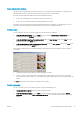
In the Windows driver dialog: select the Color tab, ensure that the Advanced color adjustments box is
checked, then press the Settings button beside it.
●
In the Mac OS Print dialog (non-PostScript printers): select the Color Options panel, select Color from the
Mode list, then press the Adjust button.
●
In the Mac OS PostScript Print dialog (PostScript printers): select the Color Options panel, select Color from
the Mode list, then press the Adjust button.
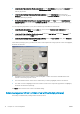
Under either operating system, you will then be able to make adjustments using a lightness slider and three
color sliders.
●
The lightness slider simply makes the whole print lighter or darker.
●
The color sliders can be used to fade or emphasize each of the primary colors in the print. The primary
colors may be red, green and blue; or cyan, magenta and yellow; depending on the color model used in the
image.
The Reset button restores each slider to its default central position.
Printing in grayscale
You can convert all colors in your image to shades of gray in the following ways:
●
In your application program: many programs provide this option.
●
In the Windows driver dialog: go to the Color tab and look at the Color Options section. Select Print in
Grayscale. You can also select Print in pure black and white if you want only black and white, without gray
shades.
ENWW Color management from printer drivers 73