
HP DesignJet T790 and T1300 Printer Series - Using your printer







●
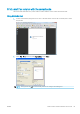
In the Mac OS Print dialog (non-PostScript printers): go to the Color Options panel and select Grayscale from
the Mode drop-down list. You can also select Pure Black and White if you want only black and white,
without gray shades.
●
In the Mac OS PostScript Print dialog (PostScript printers): go to the Color Options panel and select
Grayscale from the Mode drop-down list. You can also select Pure Black and White if you want only black
and white, without gray shades.
●
On the Embedded Web Server's Submit Job page (T1300 series): select Color, then set Color/Grayscale to
Print In Grayscale. You can also select Pure Black and White if you want only black and white, without gray
shades.
You can adjust the gray balance of your print in similar ways under Windows and Mac OS:
●
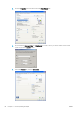
In the Windows driver dialog: select the Color tab, ensure that the Advanced color adjustments box is
checked, then press the Settings button beside it.
●
In the Mac OS Print dialog (non-PostScript printers): select the Color Options panel, select Grayscale from
the Mode list, then press the Adjust button.
●
In the Mac OS PostScript Print dialog (PostScript printers): select the Color Options panel, select Grayscale
from the Mode list, then press the Adjust button.
Under either operating system, you will then be able to make adjustments using separate controls for highlights,
midtones and shadows.
●
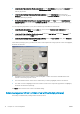
The lightness slider simply makes the whole print lighter or darker. This slider is available in the same
window as the other grayscale controls.
●
The zone denition sliders can be used to dene what you mean by highlight, midtone and shadow.
●
The other controls for highlight, midtone and shadow can be used to adjust the gray balance of highlights,
midtones and shadows respectively.
The Reset button restores each control to its default setting.
Color management from printer drivers (PostScript printers)
This facility is available when printing with the PostScript driver.
74 Chapter 10 Color management ENWW