
HP ENVY 15 Notebook PC and HP ENVY TouchSmart 15 Notebook PC Maintenance and Service Guide
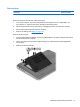





3. Disconnect all external devices from the computer.
4. Remove the battery (see
Battery on page 40).
5. Remove the service door (see
Service door on page 41).
Remove the memory module:
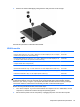
1. Lift the left edge of the memory module shield and swing it up and to the right until the memory
modules are accessible.
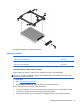
2. Spread the retaining tabs (1) on each side of the memory module slot to release the memory
module. (The memory module tilts up.)
48 Chapter 5 Removal and replacement procedures for Customer Self-Repair parts