User's Manual
Manuals
Brands
HP Manuals
computer components
FL939UT
171
172
173
174
175
176
177
178
179
180
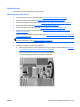
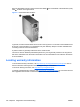
5.
Rotate the battery eno
ugh to get beyond
the latch,
and then
lift it straight up a
s shown in the
following figure
.
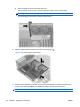
Figure 5-105
Removing the battery
162
Chapter 5 Re
placing compone
nts
ENWW
1
...
...
172
173
174
175
176
...
...
248