
Other Content


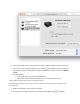


1. Press the Power button to turn off the printer, and then wait five seconds.
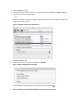
2. Disconnect the USB cable from the rear of the printer.
Figure : Disconnect the USB cable from the rear of the printer
3. Press the Power button to turn on the printer.
The printer makes some noise as it powers on and might start printing pages. Wait for the printer
to become idle and silent before continuing.
4. Wait five seconds, and then reconnect the USB cable to the printer. Apply enough pressure to
make sure the connection is secure. If the printer starts to print, let it finish printing before
continuing.
Figure : Connect the smaller end of the USB cable to the rear of the HP printer
Figure : Connect the larger end of the USB cable to the computer
5. Try printing again.
If the printer prints, you can stop troubleshooting.
If the print job becomes stuck again, continue to the next step.