
Other Content


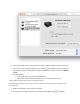


3. Click the Add button .
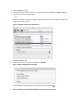
4. Find and select the name of your printer from the Printer list, and then click Add to add your
printer. Do not select an HP Fax driver.
NOTE:
If your printer does not display in the list, make sure the printer is connected, turned on, has
power, and is ready to print.
Figure : Example of the printer selection list
5. Click Print Using or Use.
6. Select the name of your printer (if available) or AirPrint.
Figure : Menu showing AirPrint selected
Your new printer queue displays in the Printers list in an Idle status .
Figure : Example of a newly added printer in the Printers & Scanners list