
Other Content


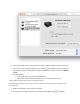


7. Try printing again.
If the printer prints, you can stop troubleshooting.
If the printer remains offline or displays an error, continue to the next step.
Step 5: Reset the printing system
If all previous troubleshooting did not resolve the issue, try resetting the printing system.
CAUTION:
Resetting the print system deletes all devices in the print queue. This includes both HP and non-HP
devices.
Video of resetting the printing system
View this video on YouTube.
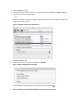
1. Right-click (or Ctrl + click) the blank space in the Printers list, and then click Reset printing
system....
Figure : Resetting the print system