
User Guide


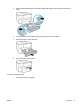



7. Check the input tray area inside the printer. If there is paper, remove the paper.
8. Reinsert the input tray into the printer.
NOTE: When you insert the input tray, the input tray extension remains outside of the printer. This is
the expected result.
9. Pull out the output tray extension to the A size marking.
Pull out the output tray extension to the B size marking.
To load an envelope
1. Pull out the input tray completely.
2. If there is other paper in the input tray, remove the paper.
3. Slide the paper guides towards the edges of the tray as far as possible.
ENWW Load paper 19