
User's Manual



Lock and unlock
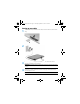
Lock—Press the power button.
Unlock—Press the power button to turn on the tablet, then place your finger on the
lock icon
and slide the icon to the unlock position.
Turn off the tablet
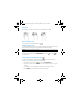
Press and hold the power button, touch Power off, and then touch OK. If your tablet
becomes unresponsive, press and hold the power button for several seconds to turn
off the tablet.
Using the Home screen
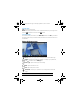
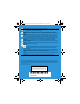
Search—Allows you to type one or more keywords to search with Google.
All apps—Displays a list of all apps installed. To configure your preferences,
touch , and then touch the Settings icon.
Recent apps—Opens a list of apps used recently.
Home—Opens the Home screen.
Back—Opens the previous screen.
Voice search—Allows you to speak one or more keywords to search with
Google.
NOTE: The appearance of the Home screen may vary.
Bonsai10QS_SL.book Page 2 Thursday, September 12, 2013 6:23 PM