
User's Guide
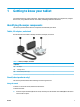
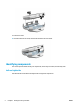


Table Of Contents
- Getting to know your tablet
- Network connections
- Managing power
- Security
- Maintenance
- Electrostatic discharge
- Accessibility
- Index
- Untitled
- Untitled

1 Getting to know your tablet
Your tablet features top-rated components. This chapter provides details about your components, using the
Home screen, using dierent features of the tablet, and nding additional information.
Identifying the major components
This section provides details about the components included with your tablet.
Tablet, AC adapter, and stand
Use the illustration and table to identify the tablet, AC adapter, and stand.
Table 1-1 Tablet, AC adapter, and stand
Component
(1) AC Adapter
(2) HP Bridge Tablet
(3) Stand (select products only)
Stand (select products only)
This section provides details about attaching and removing the stand.
Using the stand
To attach or remove the stand, follow these instructions.
To attach the stand:
▲ Insert the top of the tablet (1) into the stand, and then press the bottom of the tablet (2) into the stand
until it clicks into place.
ENWW 1