
User's Guide
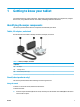
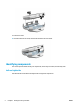


Table Of Contents
- Getting to know your tablet
- Network connections
- Managing power
- Security
- Maintenance
- Electrostatic discharge
- Accessibility
- Index
- Untitled
- Untitled

Table 1-2 Left and right side components and their descriptions
Component Description
(1) Shortcut buttons Create user-programable shortcuts to launch frequently used
applications.
The following are the default settings for the shortcut buttons:
● Wake the display
● Open the
ashlight app
● Open the HP Device Tools app
(2) Internal microphones Record sound.
Top and bottom
Use the illustration and table to identify the top and bottom components.
Table 1-3 Top and bottom components and their descriptions
Component Description
(1) Volume up button Increases speaker volume on the tablet.
ENWW Identifying components 3