
User's Guide
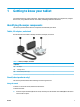
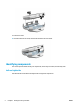


Table Of Contents
- Getting to know your tablet
- Network connections
- Managing power
- Security
- Maintenance
- Electrostatic discharge
- Accessibility
- Index
- Untitled
- Untitled

Table 1-4 Display components and their descriptions
Component Description
(1) Battery/noti ication light ● Red: The AC adapter is connected and the battery is
charging.
● Green: The AC adapter is connected and the battery is
fully charged.
● On: There is a noti ication from an app.
(2) Camera Records video and captures photographs.
(3) Ambient light sensor Adjusts the brightness of the display, depending on the ambient
light.
(4) Speaker Produces sound.
Back
Use the illustration and table to identify the back components.
Table 1
-5
Back components and their descriptions
Component Description
(1) Vents Enable airow
airow to cool internal components.
(2) Security cable slot Attaches an optional security cable (purchased separately) to
the tablet.
NOTE: The security cable is designed to act as a deterrent, but
it might no
t prevent the tablet from being mishandled or stolen.
(3) Camera lash/ lashlight Provides a camera lash or lashlight. You can control the
camera lash
using the Camera app. Use the HP Device Tools app
to open the lashlight.
(4) Camera Records video and captures photographs.
(5) Battery cover screw Releases the battery cover.
ENWW Identifying components 5