
User's Guide
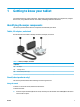
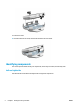


Table Of Contents
- Getting to know your tablet
- Network connections
- Managing power
- Security
- Maintenance
- Electrostatic discharge
- Accessibility
- Index
- Untitled
- Untitled

Labels
The labels axed or etched onto the tablet provide information you might need when you troubleshoot
problems or travel internationally with the tablet.
IMPORTANT: Check the back of the tablet, inside the battery bay, the software, and the packaging for the
labels described in this section.
NOTE: Your label might look slightly dierent from the illustrations in this section.
● Service label—Provides important information to identify your tablet. When contacting support, you will
probably be asked for the serial number and possibly for the product number. Locate these numbers
before you contact support.
Table 1-6 Service label components
Component
(1) Model name
(2) Warranty period
(3) Serial number
(4) Product number
Regulatory label(s)—Provide(s) regulatory information about the tablet.
● Wireless certication label(s)—Provide(s) information about optional wireless devices and the approval
markings for the countries or regions in which the devices have been approved for use.
Locating system information
System information is available in the Settings app.
Accessing the About tablet settings
The About tablet option of the Settings app provides information about the serial number, product number,
and IMEI.
To access the About tablet setting:
1. Swipe up on the Home screen icon to access the applications.
2. Touch Settings, and then touch About Phone.
View the model number and version information.
6 Chapter 1 Getting to know your tablet ENWW