
HP 517 802.11ac Unified Walljack Configuration Guide v6.4.0


Settings
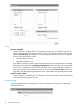
Discover using DNS
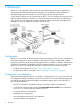
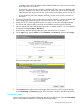
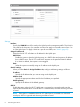
When this option is enabled, the HP 517 attempts to connect with a controller using the host
names in the order that they appear in the list. The HP 517 appends each host name with the
specified Domain name. For example, the screen image above shows the HP 517 configured
to search using the following names:
• controller-1.mydomain.com
• controller-2.mydomain.com
If you define a name that contains a dot, then the domain name is not appended. For example,
if the name in the search list is controller.yourdomain.com, then no domain name is appended.
If the HP 517 is operating as a DHCP client, the DHCP server will generally return a domain
name when it assigns an IP address to the HP 517. If you leave the Domain name field on this
page blank, then the DHCP-assigned domain name is appended to the specified names instead.
Discover using IP address
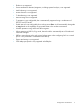
When this option is enabled the HP 517 attempts to discover a controller using the IP addresses
in the order that they appear in this list.
Location page
You can optionally use the Location page to record a reminder as to where you are physically
installing the HP 517.
10 Provisioning the HP 517