
HP 517 802.11ac Unified Walljack Configuration Guide v6.4.0



Settings
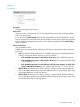
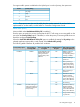
Port settings
Port name
Friendly name assigned to the port.
Flow control
When this option is enabled, the HP 517 uses Ethernet flow control when exchanging traffic
with a connected device.
If you are using the Rate limiting option to limit ingress traffic you should enable flow control.
This will ensure that a client device does not send traffic in excess of the ingress limit (providing
that the client device supports flow control). Excess traffic is dropped when the Rate limiting
option is enabled.
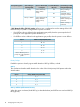
Power over Ethernet
Only available on Port 4.
Enables power forwarding on Port 4 allowing a PoE device to be powered when connected
to this port.
• Auto: The AP dynamically determines the available input power (via hardware detection
or LLDP), and sets the amount of power on port 4 as follows:
• If the available input power is 802.3af (12.95 W max.): PoE is disabled on port 4.
• If the available input power is 802.3at (25.5 W max.): Port 4 supports 802.3af Class
1 and 2 devices.
• If the available input power is provided by the AC/DC power adapter, or the HP PoE+
injector (J9867A) (30 W max.): Port 4 supports 802.3af Class 1, 2, and 3 devices.
• 802.3af Class 2: Forces the AP to class 2 power in situations where automatic detection
may not be able to determine the actual available input power. For example, when using
non-standard 802.3af+ or 802.3at+ devices.
• 802.3af Class 3: Forces the AP to class 3 power in situations where automatic detection
may not be able to determine the actual available input power. For example, when using
non-standard 802.3af+ or 802.3at+ devices.
Port configuration page 15