
HP 517 802.11ac Unified Walljack Configuration Guide v6.4.0


Four egress traffic queues are defined on the Uplink port. In order of priority, the queues are:
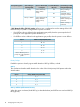
Priority settingQueue
Very-high1
High2
Normal3
Low4
NOTE: These queues are also used by traffic from the wireless network. To see how QoS is
implemented for wireless traffic, see the MSM7xx Controllers Configuration Guide.
Default traffic priority
(Not available when
Send Network Policy TLV
is enabled.)
Use this option to specify the priority (queue) that the HP 517 will assign to incoming traffic on the
port when the Priority lookup option is disabled, or when the priority of incoming traffic does not
match the configured Priority lookup.
When the Send LLDP MED Network Policy TLV option is enabled, the setting for L2 priority in the
selected application type profile is used instead of the Default traffic priority.
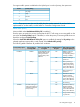
The following table summaries all possible QoS conditions.
QoS marking on traffic
exiting the Uplink port
Is a VLAN defined on
the port?
Queue to which traffic
is assigned
QoS marking on
incoming traffic
Priority lookup option
DiffServ marking is
preserved plus
YesQueue defined by the
Default traffic priority
DiffServDisabled
corresponding 802.1p
marking is added.
setting or the LLDP
Network Policy TLV if
defined*.
DiffServ marking is
preserved.
No
802.1p marking is
replaced by Default
Yes802.1p
traffic priority setting
or the LLDP Network
Policy TLV if defined*.
802.1p marking is
preserved.
No
Remarked as 802.1p
based on Default
YesNone
traffic priority setting
or the LLDP Network
Policy TLV if defined*.
No marking.No
Remarked as 802.1p
based on Default
YesNo QoS marking or a
marking that does not
Enabled
traffic priority settingmatch the configured
Priority lookup or the LLDP Network
Policy TLV if defined*.
Original QoS marking
is preserved.
No
Port configuration page 17