
HP 517 802.11ac Unified Walljack Configuration Guide v6.4.0
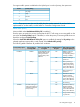


QoS marking on traffic
exiting the Uplink port
Is a VLAN defined on
the port?
Queue to which traffic
is assigned
QoS marking on
incoming traffic
Priority lookup option
802.1p marking is
preserved.
YesQueue defined by
802.1p Priority
lookup.
802.1p
Unmarked. 802.1p
marking is removed.
No
Both 802.1p and
DiffServ markings are
preserved.
YesQueue defined by the
802.1p and then
DiffServ Priority
lookup.
802.1p + DiffServ
DiffServ marking is
preserved.
No
* LLDP Network Policy TLV QoS setting: When a port is configured to use the settings of the LLDP
Network Policy TLV, traffic is assigned to the queues as follows:
• If no DiffServ value is defined in the application type profile, then the queue equals the L2
priority set in the application profile divided by 2.
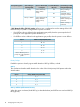
• If a DiffServ value is defined in the application type profile, then the queue is set as follows:
DiffServ codepoint (DSCP) valueQueue
48 - 631
32 - 472
24 - 313
8 - 234
0 - 7Queue defined by the L2
priority set in the application
profile.
Priority lookup
Enable this option to classify ingress traffic based on 802.1p, DiffServ, or both.
802.1p
This mechanism classifies traffic based on the value of the VLAN priority field present within the
VLAN header.
802.1p (VLAN priority field value)Queue
6, 71
4, 52
1, 23
0, 34
802.1p + DiffServ (Differentiated Services)
When this option is selected, both 802.1p (as described above) and DiffServ are used with 802.1p
taking priority.
18 Configuring the switch ports