
HP 517 802.11ac Unified Walljack Configuration Guide v6.4.0
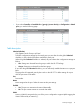


2. Select Controller >> Security > MAC lists.
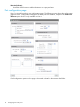
3. Select Add New MAC List. The Add/Edit MAC list page opens.
Each entry in the MAC list contains a MAC address and its associated mask.
4. For Name, specify a name to identify the MAC address list.
5. For MAC address, specify the MAC address to match. Define the address using 12 hexadecimal
numbers in the format nn:nn:nn:nn:nn:nn.
6. For Mask, specify the mask that will be applied to the MAC address. This is a binary mask
in the format nn:nn:nn:nn:nn:nn.
By varying the mask, an entry can match a single address or a range of addresses.
• For example, the following definition matches a single MAC address:
nl
MAC address=00:03:52:07:2B:43
nl
Mask=FF:FF:FF:FF:FF:FF
• To match a range of addresses, use the wildcard feature. A value of 0 in a mask means
that the corresponding position in the address is a wildcard (that is, it can be any value).
Multiple wildcards can be used.
nl
For example, the following definition matches a range of MAC addresses from
00:03:52:07:2B:40 to 00:03:52:07:2B:4F:
nl
MAC address=00:03:52:07:2B:43
nl
Mask=FF:FF:FF:FF:FF:F0
nl
The following definition matches all the devices with the MAC prefix (OUI) of 00:03:52
nl
and their final bytes set to AA:FF.
nl
MAC address=00:03:52:00:AA:FF
nl
Mask=FF:FF:FF:00:FF:FF
7. Select Add
8. Repeat steps 4 to 7 until you have defined all needed entries.
9. Select Save.
20 Configuring the switch ports