
HP 517 802.11ac Unified Walljack Configuration Guide v6.4.0
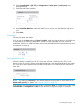

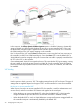

10. Select Controlled APs > [HP 517] >> Configuration > Switch ports > [switch-port] in the
management tool.
11. Select the MAC filter checkbox.
12. Under Available MAC lists, select each MAC list you want to use and select the right arrow
icon.
13. Select Save.
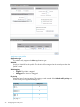
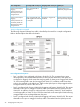
Link settings
Sets the port speed and duplex.
If you do not use the Auto setting for Speed or Duplex, make sure that the device to which the port
is connected has a matching configuration. If there is a speed mismatch, the link will not be
established. If there is a duplex mismatch, the link may be established but with transmission errors
and reduced connectivity.
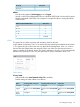
Send Network Policy TLV
When this feature is enabled, an HP 517 switch port will send a Network Policy TLV to voice
devices such as IP phones, with the values that are defined in the selected application type profile.
The voice device must implement the LLDP-MED specification to successfully receive and process
these TLVs.
NOTE: The setting for L2 priority in the selected application type profile is used instead of the
Default traffic priority. For details, see “Quality of service” (page 16).
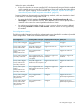
In this release, only one application type profile is supported: Voice. To configure this profile, select
Controlled APs >> Configuration > LLDP to open the LLDP configuration page. For example:
nl
nl
Port configuration page 21