
HP 517 802.11ac Unified Walljack Configuration Guide v6.4.0
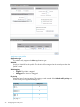
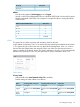

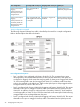
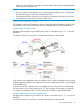
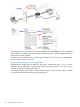
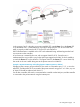

This table only applies when the following options are disabled:
• Quarantine VLAN
• Allow dynamic VLAN assignment
Notes on Uplink tagging
When the Uplink tagging option is selected, incoming and outgoing traffic on ports 1 to 4 is
untagged. Internally however, the traffic is tagged with the Primary VLAN ID. This means that
if two ports are set to Uplink tagging with different Primary VLAN IDs, then traffic cannot be
exchanged between the two ports.
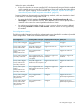
For example, if the ports are configured as follows:
Uplink portOutgoing trafficIncoming trafficConfigurationPort
Tagged with VLAN
10.
Untagged.Only untagged traffic is
accepted.
Primary VLAN=Uplink
tagging Primary VLAN ID=10
1
Tagged with VLAN
20.
Untagged.Only untagged traffic is
accepted.
Primary VLAN=Uplink tagging
Primary VLAN ID=20
2
Tagged with VLAN
30.
Untagged.Only untagged traffic is
accepted.
Primary VLAN=Uplink tagging
Primary VLAN ID=30
3
Tagged with VLAN
30.
Untagged.Only untagged traffic is
accepted.
Primary VLAN=Uplink tagging
Primary VLAN ID=30
4
It means that:
• Although Ports 1 and 2 both only accept untagged traffic, they cannot exchange traffic
because internally their traffic is tagged on different VLANs.
• Ports 3 and 4 can exchange traffic because internally their traffic is tagged on the same
VLAN. The VLAN tag is stripped when the traffic is sent out on the ports.
Primary VLAN ID
(Not available when
Send Network Policy TLV
is enabled)
VLAN ID to assign to the primary VLAN.
Secondary VLAN
(Not available when
Send Network Policy TLV
is enabled.)
When this option is enabled, the port will support a second VLAN with the specified value.
The secondary VLAN is always tagged on both the switch port and the Uplink port.
Quarantine VLAN
When this option is enabled, users that fail to be authenticated still gain access to the port.
However, all user traffic is forced onto the specified quarantine VLAN.
Allow dynamic VLAN assignment
When this option is enabled:
• VLAN behavior on the port changes once the user is authenticated and the dynamic VLAN
is assigned. See the Port configuration summary later in this section for details.
• The port can only be bound to a non-access-controlled VSC or not bound to any VSC.
24 Configuring the switch ports