
HP 517 802.11ac Unified Walljack Configuration Guide v6.4.0
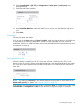
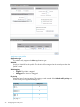
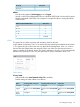

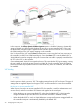

When this option is disabled:
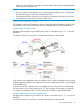
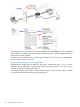
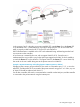
• If the port is bound to an access-controlled VSC, the dynamically assigned VLAN is applied
on the controller and not on the HP 517. The dynamic VLAN will override the VLAN settings
on the VSC egress mapping on the controller. See “Example 4. Dynamic VLAN usage
when Allow dynamic VLAN assignment is disabled” (page 29).
Dynamic VLANs can be assigned using the following methods, which are described in detail
in the MSM7xx Controllers Configuration Guide.
• By setting the RADIUS attributes Tunnel-Medium-Type, Tunnel-Private-Group-ID, and
Tunnel-Type in a user's RADIUS account. These attributes can be used to specify either a
VLAN ID or the name of a network profile that defines a VLAN.
• By configuring a VLAN number directly in a user's account. (User accounts are defined
by selecting Controller >> Users > User accounts. Network names are not supported by
this method.
Port configuration summary
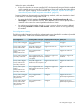
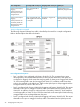
The following table illustrates how traffic for authenticated users is handled for a number of possible
VLAN configurations. Traffic from unauthenticated users is blocked.
Uplink portOutgoing traffic on the portIncoming traffic on the portPort configuration
Untagged.Untagged.Only untagged traffic is
accepted.
Primary VLAN=Untagged
Tagged with VLAN 20.Tagged with VLAN 20.Only traffic tagged with
VLAN 20 is accepted.
Primary VLAN=Tagged
Primary VLAN ID=20
Tagged with VLAN 20.Untagged.Only untagged traffic is
accepted.
Primary VLAN=Uplink
tagging
Primary VLAN ID=20
Untagged or tagged with
VLAN 40.
Untagged or tagged with
VLAN 40.
Only untagged traffic and
traffic tagged with VLAN 40
is accepted.
Primary VLAN=Untagged
Secondary VLAN=40
Tagged with VLAN 20 or
40.
Tagged with VLAN 20 or
40.
Only traffic tagged with
VLAN 20 or 40 is accepted.
Primary VLAN=Tagged
Primary VLAN ID=20
Secondary VLAN=40
Tagged with VLAN 20 or
40.
Untagged or tagged with
VLAN 40
Only untagged traffic and
traffic tagged with VLAN 40
is accepted.
Primary VLAN=Uplink
tagging
Primary VLAN ID=20
Secondary VLAN=40
Tagged with the user's
dynamically assigned VLAN.
Untagged.Only untagged traffic is
accepted.
Primary VLAN=Untagged
Allow dynamic VLAN
assignment=On
Tagged with the user's
dynamically assigned VLAN.
Untagged.Only untagged traffic is
accepted.
Primary VLAN=Tagged
Primary VLAN ID=20
Allow dynamic VLAN
assignment=On
Port configuration page 25