
HP 517 802.11ac Unified Walljack Configuration Guide v6.4.0

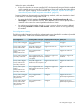
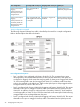

Uplink portOutgoing traffic on the portIncoming traffic on the portPort configuration
Tagged with the user's
dynamically assigned VLAN.
Untagged.Only untagged traffic is
accepted.
Primary VLAN=Uplink
tagging
Primary VLAN ID=20
Allow dynamic VLAN
assignment=On
Tagged with VLAN 40 or the
user's dynamically assigned
VLAN.
Untagged or tagged with
VLAN 40.
Only untagged traffic and
traffic tagged with VLAN 40
is accepted.
Primary VLAN=Uplink
tagging
Primary VLAN ID=20
Secondary VLAN=40
Allow dynamic VLAN
assignment=On
VLAN configuration example
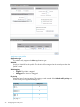
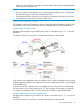
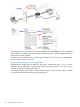
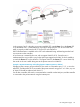
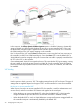
The following diagram illustrates how traffic is handled by the switch for a sample configuration.
Refer to the descriptions that follow for details.
nl
Port configuration descriptions
• Port 1 and Port 2 are configured with Primary VLAN ID=10. This connects the two ports
allowing traffic to be switched between them (as shown by the dotted line). Both ports are
configured as Tagged, which means that outgoing traffic on these ports is tagged with VLAN
10, and incoming traffic must also be tagged with VLAN 10. In addition, traffic from these
ports is also switched on the Uplink port. Traffic on the Uplink port is always tagged with the
configured VLAN ID, which in this case is 10.
• Port 3 is configured with Primary VLAN=Uplink tagging and Primary VLAN ID=20. This means
that traffic on this port is untagged. However, traffic is forwarded onto the Uplink port with
VLAN=20. In addition, the port is configured with a Secondary VLAN=10, which enables it
to exchange traffic on VLAN 10. Port 3 and Port 4 are both on the same Uplink VLAN allowing
untagged traffic to be exchanged between the ports.
• Port 4 is configured with Primary VLAN=Uplink tagging and Primary VLAN ID=20. This means
that traffic on this port is untagged. However, traffic is forwarded onto the Uplink port with
26 Configuring the switch ports