
HP 517 802.11ac Unified Walljack Configuration Guide v6.4.0
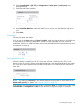
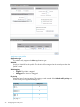

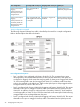
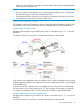
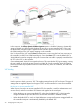

In this scenario, Port 2 is bound to an access-controlled VSC named Guest. Since the Guest VSC
is not the default VSC, a VLAN definition (10) must be assigned to the VSC to ensure that user
traffic is properly routed from the HP 517 to the VSC on the MSM7xx.
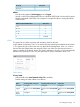
802.1X authentication is enabled on this VSC with credentials being validated against the local
user accounts on the controller.
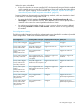
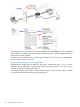
A local account is created for the user, with an egress VLAN ID of 10. Once the user is
authenticated, the user's traffic is sent on the Uplink port tagged with VLAN 10 which enables it
to reach the Guest VSC on the MSM7xx. The egress VLAN on the Guest VSC is set to VLAN 30,
this results in the user's traffic being sent to the private network on VLAN 30.
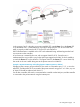
Example 4. Dynamic VLAN usage when Allow dynamic VLAN assignment is disabled
If deploying this scenario using an MSM720, the switch is connected to port 1, 2, 3, or 4 on the
MSM720, and the MSM720 is connected to the private network using port 5 or 6. Also, any use
of VLAN 10 should be replaced with VLAN 11.
On all other controllers, the switch is connected to the controller via the LAN port, and the controller
is connected to the private network using the Internet port.
Port configuration page 29