
HP 517 802.11ac Unified Walljack Configuration Guide v6.4.0
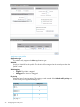

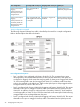
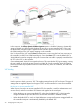

In this scenario, the Allow dynamic VLAN assignment option is disabled. However, dynamically
assigned VLANs can still be used by binding the port to an access-controlled VSC. In this case,
the dynamically assigned VLAN is applied on the controller and not on the HP 517. It overrides
the VLAN settings on the VSC egress mapping on the controller.
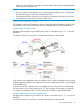
Port 2 is bound to the VSC named Guest. Authentication occurs using the local user accounts on
the controller (via 802.1X or HTML-based logins). Since the Guest VSC is not the default VSC, a
VLAN definition must be assigned to the port to ensure that user traffic is properly routed from the
HP 517 to the VSC on the controller.
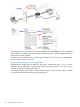
Once authenticated, VLAN 30 is assigned to the user. This overrides the VSC egress setting, causing
the user's traffic to reach the private network on VLAN 30. On the controller, VLAN 30 must be
bound to the Internet port (Internet network on the MSM720), have an IP address, and NAT must
be enabled.
VSC binding
Use this option to bind a port to a VSC. This applies settings from the VSC to the port. The type of
settings that are applied depend on the type of VSC: access-controlled or non-access-controlled.
Binding to an access-controlled VSC
When a port is bound to an access-controlled VSC, the controller is used for authentication and
access control, and all non-wireless VSC features are applied to the switch port.
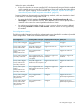
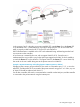
• When binding to an access-controlled VSC, other than the default VSC, a VLAN must be
assigned to both the port and the VSC to ensure that user traffic is handled correctly.
• When the default VSC is used, no VLAN definitions are required because untagged traffic on
the controller LAN port is automatically handled by the default VSC.
30 Configuring the switch ports