
HP 517 802.11ac Unified Walljack Configuration Guide v6.4.0
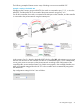
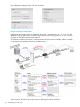
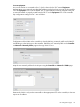

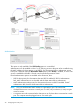

The following examples illustrate various ways of binding to an access-controlled VSC.
Example 1. Binding to the default VSC
If deploying this scenario using an MSM720, the switch is connected to port 1, 2, 3, or 4 on the
MSM720, and the MSM720 is connected to the private network using port 5 or 6.
On all other controllers, the switch is connected to the LAN port on the controller, and the controller
is connected to the private network using the Internet port.
In this scenario, Port 2 is bound to the default VSC which is called HP. Authentication occurs using
the local user accounts on the controller (via 802.1X or HTML-based logins). Once authenticated,
user A gains access to resources on the private network according to the configuration of the
controller public access interface feature. No VLANs are assigned in this example, therefore user
traffic is forwarded untagged from the HP 517 to the controller and is automatically assigned to
the default VSC.
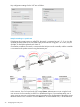
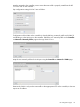
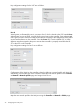
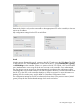
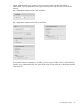
Key configuration settings for Port 2 are as follows:
Port configuration page 31