
HP 517 802.11ac Unified Walljack Configuration Guide v6.4.0
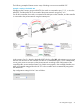
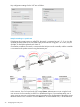
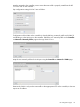
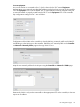
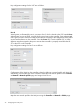
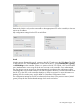

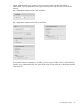
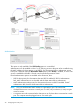

Key configuration settings for the VSC are as follows:
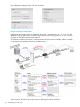
Example 2. Binding to a specific VSC
If deploying this scenario using an MSM720, the switch is connected to port 1, 2, 3, or 4 on the
controller, and the MSM720 is connected to the private network using port 5 or 6. Also, any use
of VLAN 10 should be replaced with VLAN 11.
On all other controllers, the switch is connected to the LAN port on the controller, and the controller
is connected to the private network using the Internet port.
In this scenario, Port 2 is bound to the VSC named Guest. Authentication occurs using the local
user accounts on the controller (via 802.1X or HTML-based logins). Once authenticated, user A
gains access to resources on the private network according to the configuration of the public access
interface feature on the controller. Since the Guest VSC is not the default VSC, a VLAN definition
32 Configuring the switch ports