
HP 517 802.11ac Unified Walljack Configuration Guide v6.4.0

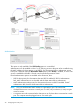

In-room equipment
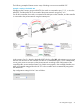
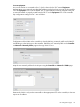
An in-room mini-bar is connected to Port 1, which is bound to the VSC named Equipment.
Authentication occurs using the mini-bar MAC address via the local user accounts on the controller.
Since the Equipment VSC is not the default VSC, a VLAN definition must be assigned to the port
to ensure that traffic is properly routed from the HP 517 to the Equipment VSC on the controller.
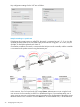
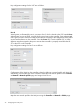
Key configuration settings for Port 1 are as follows:
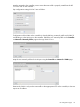
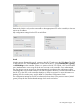
Configuration of the VLAN on the controller is done by defining a network profile with VLAN 99
and binding it to the LAN port on the controller. Define the new network profile on the Controller
>> Network > Network profiles page and assign VLAN 10 to it.
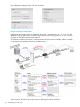
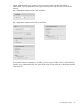
Map the new network profile to the LAN port using the Controller >> Network > VLANs page.
Because the VLAN is only used to route traffic to the appropriate VSC on the controller, it does not
require an IP address.
Port configuration page 35