
HP 517 802.11ac Unified Walljack Configuration Guide v6.4.0
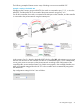

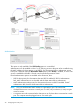

Because the VLAN is only used to route traffic to the appropriate VSC on the controller, it does not
require an IP address.
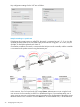
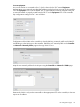
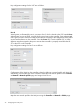
Key configuration settings for the VSC are as follows:
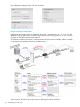
User B
Wireless guests, illustrated by user B, connect to the HP 517 radio using the SSID Guest. This SSID
is defined in the VSC named Guest which is bound to the HP 517 using Controlled APs > [group]
>> VSC bindings on the controller. (There is no option on the HP 517 to bind a VSC to the wireless
port.) Authentication occurs using the local user accounts on the controller. Once authenticated,
the user gains access to resources on the private network according to the configuration of the
controller public access interface feature. The SSID assigned to the VSC is used to route traffic from
the HP 517 to the VSC on the controller, therefore no VLAN is required. For more information on
binding VSCs for wireless users, see the MSM7xx Controllers Configuration Guide.
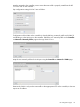
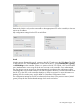
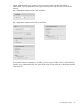
The configuration settings for the VSC are identical to those done in the previous section (Wired
guests), except for the wireless-related settings which are shown below:
Port configuration page 37