
HP 517 802.11ac Unified Walljack Configuration Guide v6.4.0


1 Introduction
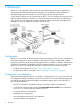
The HP 517 is an integrated switch/wireless AP designed from the ground-up for high-density
environments, providing optimal Internet connectivity, and the delivery of other applications
demanded by guests and occupants, such as IPTV, VoIP, and other IP-based services.
A wide variety of devices can be connected to the HP 517. You can configure the network to send
traffic through the MSM7xx Controller or, in cases where private access areas are isolated from
public spaces, you can bypass the controller completely. Where VoIP phones are deployed, for
example, this avoids an additional hop that can slow service.
Configuration
The HP 517 is part of the HP MSM family of wireless networking products. As such, it shares many
of the same configuration options available on other MSM APs, and is configured for wireless
operation in the same way by using the management tool on a MSM7xx controller. Therefore, see
the MSM7xx Controllers Configuration Guide for complete information on how to configure all
options on the HP 517, except for the following two items which are covered in this guide:
• Locally provisioning the HP 517. See “Provisioning the HP 517” (page 6).
• Configuring the HP 517 switch ports. See “Configuring the switch ports” (page 12).
Configuration considerations
When using the management tool on a controller to configure the HP 517, you have access to all
the configuration settings available across all HP access points. Due to their different features sets,
not all HP access points support all available configuration settings. In the case of the HP 517,
take note of the following:
• The HP 517 operates in controlled mode only. Autonomous mode is not supported.
• A VSC that is configured with the option Terminate WPA at the controller cannot be bound
to an HP 517 or an AP group that contains an HP 517.
• Local mesh links are not supported.
• Bandsteering is not supported.
• Intrusion detection system (IDS) is not supported.
• Spectralink VIEW is not supported.
4 Introduction