
HP 517 802.11ac Unified Walljack Configuration Guide v6.4.0


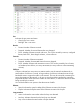
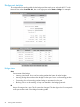


Port
Indicates the port name and status.
• Green light: Port is active.
• Red light: Port is not active.
Receive
• Frames: Number of frames received.
• Dropped: Number of received frames that were dropped.
• Errors: Number of frames received with errors. This can be caused by overruns, unaligned
frames, bad CRCs, frame length violations, or late collisions.
Transmit
• Frames: Number of frames transmitted.
• Dropped: Number of transmitted frames that were dropped.
• Errors: Number of frames with transmission errors. This can be caused by loss of carrier,
no heartbeat, late collision, too many retransmits (too many collisions when transmitting
a frame).
Collisions
Collisions indicate how many times two stations tried to use the network simultaneously. A
small number of collisions is normal. A large number of collisions indicates that not enough
bandwidth exists to support the traffic on the network. This may be caused by connecting too
many client stations to the network, or by one or more client stations performing continuous
large data transfers. Either reduce the number of client stations, or reduce the amount of traffic
being carried by the network.
You could also define user quotas to limit the amount of traffic.
Ethernet
• Speed: Indicates the speed in Mbps of the Ethernet connection for the port.
• Duplex: Indicates the duplex status of the Ethernet connection for the port.
Loop protection
• Action: Indicates the action taken when the loop was detected.
• Last loop: Indicates the time that the last loop was detected.
• Loop count: Indicates the total number of loops detected.
Port statistics 51