
HP 517 802.11ac Unified Walljack Configuration Guide v6.4.0

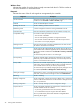

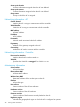
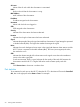


Bridge port statistics
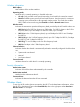
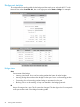
To see the traffic forwarding tables for the bridge and the switch ports, select the HP 517 in the
Network Tree under Controlled APs, then in the right pane select Status > Bridge. For example:
nl
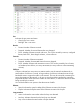
Bridge status
State
Current state of the bridge.
• Listening: Initial state. Port is not forwarding packets but listens for other bridges.
• Learning: Bridge learns about other bridges on that port. Port is not forwarding packets.
• Forwarding: Port is forwarding packets. Bridge is operational on the port.
• Blocking: Port is not forwarding. A loop was detected in the bridging network.
ID
Unique ID assigned to a port. This ID cannot be changed. The last digit in the ID corresponds
to the port number used in the Bridge forwarding table.
52 Viewing status information