
HP 517 802.11ac Unified Walljack Configuration Guide v6.4.0

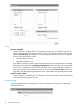

Settings
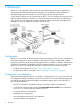
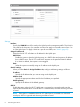
Interface
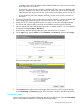
Specify the VLAN ID that will be used on the Uplink port for management traffic. This VLAN is
only used for the discovery of a controller and does not apply to user traffic sent on Ports 1 to
4 or the Uplink port. To apply a VLAN to a port for user traffic, see “VLAN” (page 23).
Assign IP address via
Select how the HP 517 will obtain an IP address for the Uplink port.
DHCP client
Enable this option to have the Uplink port act as a DHCP client and request an IP address
from a DHCP server. The HP 517 sends DHCP requests on the specified VLAN if defined.
If no VLAN is defined, the request is sent untagged.
Static
Select this option to manually assign an IP address to the Uplink port.
Static IP settings
When you select Static for Assign IP address via, configure addressing settings as follows:
IP address
Specify the IP address that you want to assign to the Uplink port.
Address mask
Specify the appropriate subnet mask for the IP address you specified.
Default gateway
Specify the IP address of the default gateway.
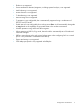
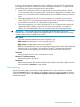
802.1X
Enable this option when the HP 517 Uplink port is connected to a secured switch port that
requires 802.1X authentication. Once the HP 517 is authenticated, controller discovery proceeds
as usual.
NOTE: If this option is enabled and the HP 517 Uplink port is connected to a unsecured
switch port, 802.1X is ignored and discovery proceeds as usual.
8 Provisioning the HP 517