
HP 517 802.11ac Unified Walljack Configuration Guide v6.4.0


In this type of environment. deployment can be a challenge, since the HP 517 must already
be configured with the correct 802.1X username and password before it is connected to the
secured switch port. There are three solutions to this problem:
• During HP 517 deployment, 802.1X is deactivated on the secured switch port. The HP
517 is connected and provisioned with the correct 802.1X settings by the controller. Once
the HP 517 is synchronized, 802.1X authentication can be enabled on the secured switch
ports.
• Before being deployed, the HP 517 is first connected to a controller via a non-secure
switch. The HP 517 is provisioned and synchronized with the correct 802.1X settings by
the controller. Next, the HP 517 is deployed to its final location.
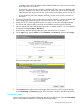
• Before being deployed, you could connect the HP 517 to a computer and configure the
appropriate 802.1X settings using the HP 517 provisioning interface. This solution is
effective for small deployments, but is not a realistic option for a large deployments.
IMPORTANT: The secured switch port is expected to be multi-homed, so that once
authentication is successful, tagged and untagged traffic for any MAC addresses (including
wireless clients) will be accepted by the switch.
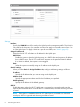
EAP method
Select the extensible authentication protocol method to use:
PEAP version 0: Authentication occurs using MS-CHAP V2.
PEAP version 1: Authentication occurs using EAP-GTC.
TTLS: The Tunneled Transport Layer Security protocol requires that the switch first authenticate
itself to the HP 517 by sending a PKI certificate. The HP 517 authenticates itself to the
secured switch port by supplying a username and password over the secure tunnel.
Username
Username that the HP 517 will use inside the TLS tunnel.
Password / Confirm password
Password assigned to the HP 517.
Anonymous
Name used outside the TLS tunnel by all three EAP methods. If this field is blank, then the
value specified for Username is used instead.
Discovery page
Use the Discovery page to provision the method that the HP 517 uses to discover a controller.
Select the Discovery option in the title bar to enable the discovery provisioning settings and then
select one discovery option, either Discover using DNS or Discover using IP address. You cannot
enable both options.
Directly provisioning the HP 517 9