
Access Security Guide K/KA/KB.15.15
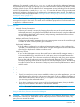

To configure a named source-port filter to prevent inbound traffic from being forwarded to specific
destination switch ports or port trunks, the dropoption is used. For example, on a 26-port switch,
to configure the named source-port filter web-only to drop any traffic except that for destination
ports 1 and 2, the following command would be used:
HP Switch(config)# filter source-port named-filter webonly drop 3-26
A named source-port filter can be defined and configured in a single command by adding the
dropoption, followed by the required destination-port-list.
Example
While named source-port filters may be defined and configured in two steps, this is not necessary.
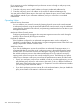
Here we define and configure each of the named source-port filters for our example network in a
single step.
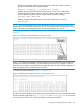
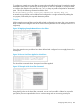
Figure 315 Applying Example Named Source-Port Filters
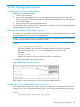
Once the named source-port filters have been defined and configured we now apply them to the
switch ports.
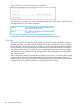
Figure 316 Source Port Filters Applied to Switch Ports
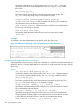
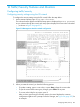
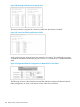
The show filter command shows what ports have filters applied.
Figure 317 Example of the show filter Command
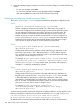
Using the IDX value in the show filter command, we can see how traffic is filtered on a specific
port (Value).The two outputs below show a nonaccounting and an accounting switch port.
Configuring traffic/security 429