
Advanced Traffic Management Guide K/KA/KB.15.15

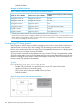
Syntax:
[no] spanning tree port-list bpdu-filter
Enables or disables BPDU filtering on the specified port(s). The bpdu-filter
option forces a port to always stay in the forwarding state and be excluded from
standard STP operation.
Default: Disabled
Syntax:
Enables or disables BPDU protection on the specified port(s).
Syntax:
spanning tree port-list point-to-point-mac [ true | false | auto ]
Informs the switch of the type of device to which a specific port connects.
true (default) Indicates a point-to-point link to a device such as a switch,
bridge, or end-node.
false Indicates a connection to a hub (which is a shared LAN
segment).
auto Causes the switch to set Force-False on the port if it is not
running at full duplex. (Connections to hubs are half-duplex.)
Syntax:
spanning tree port-list root-guard
This feature is available in RPVST+ only. When a port is enabled as root-guard,
it cannot be selected as the root port even if it receives superior STP BPDUs. The
port is assigned an “alternate” port role and enters a blocking state if it receives
superior STP BPDUs. (A superior BPDU contains “better” information on the root
bridge and/or path cost to the root bridge, which would normally replace the
current root bridge selection.)
The superior BPDUs received on a port enabled as root-guard are ignored. All
other BPDUs are accepted and the external devices may belong to the spanning
tree as long as they do not claim to be the Root device. Use the following command
on RPVST+ switch ports that are connected to devices located in other administrative
network domains to ensure the stability of the core RPVST+ network topology so
that undesired or damaging influences external to the network do not enter.
Default: Disabled.
Syntax:
spanning-tree port-list tcn-guard
When tcn-guard is enabled for a port, it causes the port to stop processing or
propagating received topology change notifications and topology changes to other
ports.
Default: Disabled.
Enabling or disabling RPVST+ spanning tree
With the spanning tree mode set to RPVST+, you can do either of the following:
• Enable or disable RPVST+ on all VLANs on the switch.
• Enable or disable RPVST+ on specified VLANs that are RPVST+-enabled on the switch.
Syntax:
[no] spanning-tree [ enable | disable ]
Configuring RPVST+ 135