
Advanced Traffic Management Guide K/KA/KB.15.15
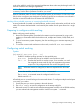

Example 127 Configuring meshing
To configure meshing on ports A1-A4, B3, C1, and D1-D3:
HP Switch(config)#: mesh a1-a4, b3, c1, d1-d3
Command will take effect after saving configuration and reboot.
HP Switch(config)#: write memory
HP Switch(config)#: boot
Device will be rebooted, do you want to continue [y/n]? Y
Example 128 Removing a port from meshing
To remove a port from meshing, use the no version of mesh, followed by write memory and
rebooting the switch. For example, to remove port C1 from the mesh:
HP Switch#: config
HP Switch(config)#: no mesh c1
Command will take effect after saving configuration and reboot.
HP Switch(config)#: write memory
HP Switch(config)#: boot
Device will be rebooted, do you want to continue [y/n]? y
Configuring switch meshing (Menu)
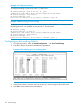
1. From the Main Menu, select: 2. Switch Configuration —> 2. Port/Trunk Settings
2. Press E (for Edit) to access the load balancing parameters.
Example 129 Configuring ports for meshing (menu)
3. In the Group column, move the cursor to the port you want to assign to the switch mesh.
4. Press M to choose Mesh for the selected port.
170 Switch meshing