
Advanced Traffic Management Guide K/KA/KB.15.15

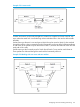


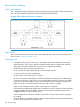


The following example shows two routers and one switch that are meshed together. Packets arriving
at the non-mesh ports on VLAN X on Router A may be routed to VLAN Y. Load balancing determines
which port Router A should send the packets to in order for the packets to reach Router B.
Example 133 Meshing with two routers and one switch
Viewing switch mesh status
Syntax:
show mesh
show mesh mac-address
show mesh traceroute mac-address MAC-addr vlan vid
These three commands list the switch ports configured for meshing, along with the
state of each mesh-configured connection, the hostname and MAC address of the
switch on the opposite end of the link (Adjacent Switch), the MAC address of the
port on the opposite end of the link (Peer Port), and whether or not any mesh
warnings have been generated. Mesh warnings are written to the event log.
The switch presents show mesh output in the following format:
Adjacent Hosts
Port State | Hostname Address Peer Port Mesh Warning
----- ----------- + -------- ----------- ----------- ------------
See the log file for details of warnings.
Port Lists the ports on the switch that have been configured for meshing.
State Shows the operating state of the port:
Established The port is linked to a meshed port on another switch
and meshing traffic is flowing across the link. The
show mesh listing includes the MAC addresses of the
174 Switch meshing